
Configuration
Control and configuration of the system is performed through the wireless touchscreen. Program the desired automatic operation, or manually open/close doors or turn on/off lights or ventilation/heat. See the current state of the system in both automated or manual mode.


Main Screen
Displays the operating modes and the current status. The text colors change based on the status.
-
Yellow background: On or Open
-
Blue background: Opening or Closing
-
Red background: Incorrect state detected
-
Red text: Closing interrupted due to object detection
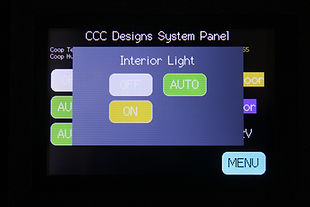
Set the operation mode by tapping on the corresponding button.
-
Off/Close: Manual off or close
-
On/Open: Manual on or open
-
Auto: Operate based on the programmed setting
The six systems that are controlled from the main screen:
-
INT Light: Interior light within the coop. Program to turn on if you would like light at dusk for a set duration to encourage laying, or if you need to check on your flock at night.
-
EXT Light: Exterior lighting outside the coop, run, or other areas of the yard. Programming mode includes turning on the light between dusk to dawn for security or to deter predators.
-
Fan: Ventilation for the coop. Program to turn on above a set temperature.
-
Coop Door: Door for the coop. Program to open at dawn with a delay, or close at dusk with a delay to ensure the flock returns at night.
-
Run Door: Door for the run. Program to open at dawn with a delay, or close at dusk with a delay. Control when the flock has access to free ranging, and ensure predators have gone away in the morning.
-
AUX 12V: Control signal for a relay for a heater or directly power for a second fan. Program to turn on above a set temperature, or turn on below a set temperature.

Menu 1
View historical information and event logs from the Menu 1 page. View daily high and low temperatures, recent actions taken by the coop controller, sensor states, and when dawn or dusk last occurred.
The recent action log shows what occurred and timestamp. From the log example, I can see that the coop had been hot until late in the evening before the fan shut off. Texas weather is hot in August!


Menu 2
Configure the automatic settings for each of the coop systems, specify the light threshold for when to identify the dusk/dawn point, and configure the system clock. The system clock has a battery backup to preserve the time in the event of a power outage.
Coop and Run Door automatic settings are configured in two ways:
-
Open at dawn or close at dusk, with a delay
-
Open or close at a specific time
The motor run time is specified in seconds, with separate run times for open or close operations.
Manual door control is configured from the main screen.

Interior and Exterior Light automatic settings are configured in three ways:
-
Turn on at dusk and remain on for a duration
-
Turn on at dusk and turn off at dawn
-
Turn on and off at specific times
Manual light control is configured from the main screen.

Fan automatic settings is configured by setting the temperature at when the fan turns on after the temperature is above for 1 continuous minute. It will turn off after the temperature falls below for 1 continous minute.
Manual fan control is configured from the main screen.

Auxilary power settings is configured by setting the temperature at when the auxilary 12V turns on after the temperature falls below for 1 continuous minute. It will turn off after the temperature rises above for 1 continous minute. This is typically used to drive an external relay to power a heater. Alternatively, the 12V can be used to supply a heater up to 10A, limited by a total system power use of 10A.


Menu 3
Review system information, set calibration values, and access troubleshooting information. System Start tells you when the Coop Controller last restarted, which is useful for identifying power supply issues.